Q1. Which form view mode allows you to preview live data while you work on the design of the form?
Q2. How can you add multiple button controls to a form at once?
Q3. What is the Access string operator that joins or concatenates text strings together?
Caveat: "In a desktop database, you can also use the ampersand operator (&) for concatentation. In an Access app, you must use the plus sign (+)."_
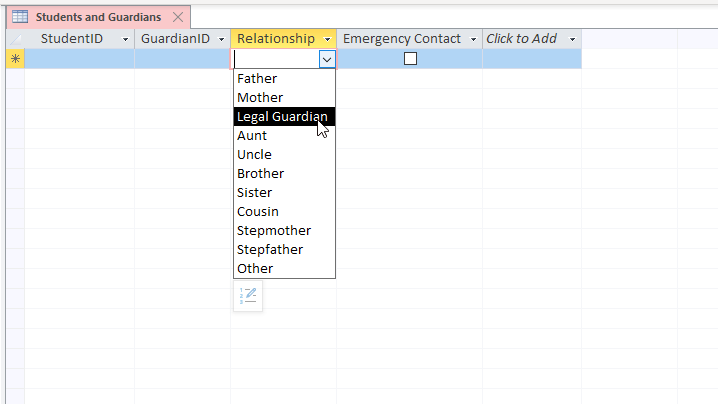
Q4. The relationship field in this table has been created with what feature?
Q5. On a report, you want to display a header for each change in month name. How should you set up the Group and Sort options so that they are in the proper chronological order?
Q7. What currency format displays a thousands separator, but not a currency symbol, such as $ or €?
Q8. In Access Option > Current Database, what does turning off the Allow Full Menus option do?
Q9. You want to create a form to view a customer's details, as well as some information about all order that the customer has placed with your company. What is the best way to display this information on a single screen?
Q10. You want a form to appear automatically, whenever the database starts. How would you do this?
Q11. In Design view, which area of a form is the primary location for text boxes, buttons, and other control objects?
Q12. What tool builds a report containing detailed information about the object in the database?
Q13. You want to validate a proposed modification to a record's value before the table is saved to the database. What data macro can you add to the table to do this?
Q15. A table contains a field with the lookup properties set as shown. What will be the value of the field when the end user clicks Normal from the combo box when entering a record into the table?
| General | Lookup |
|---|---|
| Display Control | Combo Box |
| Raw Source Type | Value List |
| Raw Source | 1:"High"; 2 :"Normal"; 3: "Low" |
| Bound Column | 1 |
| Column Count | 2 |
| Column Heads | No |
| Column Widths | 0; 1 |
| List Rows | 16 |
| List Width | Auto |
Q16. What program flow function evaluates a condition and returns either a truepart or a falsepart?
Q17. The display for numerical data defaults to a _alignment, and text data defaults to _aligntment
Q19. How can you ensure that each value saved in a particular field is unique from all other values in the field?
Q20. Which Access database tool will help you split a single, large, unnormalized data table into multiple related tables that follow the best practices of good database design?
Q21. When backing up an Access database, what is added to the file name automatically?
Q22. Which table field property, if supplied, will display instead of the field name as a column header when viewing the datasheet of as a label when the field is added toa form or report?
Q23. Which form control property creates a small pop-up flag that contains text when a user hovers the mouse cursor over the object?
Q26. When would you use a left join query?
Q27. How can you run a submacro saved in a macro?
Q28. Which combo box property defines what values appears when the user clicks the drop-down arrow?
Q29. What does the expression Now() evaluate to?
Q30. Certain words have special meaning to Access, and you should avoid using them as table or field names. What are these words called?
Q30. What is the operator for "not equal to"
Q31. You need to email a report to a coworker that maintains all formatting and page layout attributes. Which file format should you choose from the Print Preview ribbon?
Q32. Which section can a form not contain?
Q33. The Run button and the View Datasheet button do exactly the same thing for which query type?
Q34. You have a database file that generates an error from a custom macro immediately after opening. How can you open the database and bypass the startup options to prevent the macro from running so that you can fix the error?
Q35. You want to ensure that a query recordset is read-only and cannot modify the underlying data tables it references. How can you do that?
Q36. Which form control object contains a number of option buttons, check boxes, or toggle buttons, and allows the user to make only a single selection?
Q37. Which query criteria will return records for "Debra" and "Donna" but not "Daniel"?
Solution:
MS Access > Create > Table > Rename Table1 to table_name > Add column first_name Short Text > Add Debra, Donna, Daniel
OR
MS Access > Create > Query Design > SQL View
CREATE TABLE table_name (first_name Text);

-- Note: In MS Access SQL, you cannot directly insert multiple values into a column.
-- Note: In MS Access SQL, you need to execute each statement separately.
INSERT INTO table_name (first_name) VALUES ('Debra');
INSERT INTO table_name (first_name) VALUES ('Donna');
INSERT INTO table_name (first_name) VALUES ('Daniel');
-- Press F5 to refresh Datasheet View.
Check queries:
SELECT first_name FROM table_name WHERE first_name Like "*n*"; -- Donna, Daniel
SELECT first_name FROM table_name WHERE first_name Like "*[ro]*"; -- Debra, Donna
SELECT first_name FROM table_name WHERE first_name Like "De* or Do*"; -- null
SELECT first_name FROM table_name WHERE first_name Like "D*"; -- Debra, Donna, Daniel
Q38. When using the Expression Builder to create a calculated column in a table, which statement is not true?
Explanation: Double negative. It's not true that the calculation cannot use custom Visual Basic functions. => It's true that the calculation can use custom Visual Basic functions.
Q39. You are implementing an OnError action and want the macro to continue on to the following step if it encounters an error. What should you set as the Go To argument?
Q40. You have several label objects in a form. You customized the font and size of one, and want to format the others to match. What is the best way to do this?
Q41.When adding a picture to a form, which Picture Size Mode property will keep the image at 100% of its original size, even if the bounding box is smaller?
Q42. Which single-line query criteria would not be equivalent to the multilinied one pictured?
Solution:
MS Access > Create Tab > Table > Rename Table1 to Customers > Add column City Short Text > Add records Houston, Boston, Chicago
Create Tab> Query Design > Add Table Customers > Field: City > Or "Houston" "Boston" "Chicago"
OR
MS Access > Create Tab > Query Design > SQL View
CREATE TABLE Customers (City Text);

-- Note: In MS Access SQL, you cannot directly insert multiple values into a column.
-- Note: In MS Access SQL, you need to execute each statement separately.
INSERT INTO Customers (City) VALUES ('Houston');
INSERT INTO Customers (City) VALUES ('Boston');
INSERT INTO Customers (City) VALUES ('Chicago');
-- Press F5 to refresh Datasheet View.

SELECT Customers.City
FROM Customers
WHERE (((Customers.City)='Houston')) OR (((Customers.City)='Boston')) OR (((Customers.City)='Chicago'));
Check queries:
SELECT City FROM Customers WHERE City Or ("Houston","Boston","Chicago"); -- Syntax error (comma) in query expression
SELECT City FROM Customers WHERE City In ("Houston","Boston","Chicago"); -- equivalent
SELECT City FROM Customers WHERE City = "Houston" Or "Boston" Or "Chicago"; -- equivalent
SELECT City FROM Customers WHERE City = "houston" Or "boston" Or "chicago"; -- equivalent